Why You Need to Reduce Photo Size in KB
Many websites, forms, and apps have strict file size limits. Government portals often require photos under 100KB. Email attachments have limits. Dating apps require small profile photos. Getting a photo to a specific file size is a common real-world challenge.
How File Size Works
Image file size depends on three things:
- Dimensions (pixels) — A 4000×3000px photo has 12 million pixels. A 1000×750px photo has 750,000 pixels. The smaller photo is 16x less data before compression.
- Compression level (quality) — JPEG quality 80 is roughly half the size of quality 100, with barely any visible difference.
- Format — WEBP is 25–35% smaller than JPEG at the same quality. PNG is much larger than JPEG for photographs.
Step-by-Step: Reduce to Any Target KB
Target under 500KB
Resize to 1200×900px maximum, save as JPEG at quality 80. Most photos will be 100–300KB.
Target under 200KB
Resize to 1000×750px, JPEG quality 75. Result: typically 80–180KB.
Target under 100KB
Resize to 800×600px, JPEG quality 70. Result: usually 50–100KB.
Target under 50KB
Resize to 600×450px, JPEG quality 65. Result: typically 30–60KB.
Free Online Tool
Our Image Compressor tool lets you compress images online for free. You can also use our Resize Image tool to reduce dimensions first, then compress.
Tip: Always resize before compressing. Compressing a large image gives worse results than compressing a correctly-sized image.
By Format
JPEG/JPG: Use quality 70–85. Most effective for photos.
PNG: Convert to JPEG first if transparency isn't required. PNG files for photos are 3–5x larger than JPEG.
WEBP: Use quality 75. Produces the smallest files of any format.
Common Real-World Use Cases
Government and Visa Application Portals
Most official portals have a strict file size cap — typically 100KB to 200KB — alongside specific pixel dimensions (e.g., 35×45mm at 300 DPI for passport photos). The correct workflow: resize to the required pixel dimensions first, then compress until you're under the limit.
Email Attachments
Gmail, Outlook, and Yahoo cap attachments at 10–25MB total, but a 5MB JPEG photo is still impractical to send to multiple recipients. Aim for under 500KB per photo for email. A 1200px wide JPEG at quality 80 is almost always under that threshold.
E-Commerce Product Listings
Platforms like Amazon, eBay, Etsy, and Shopify accept large files but aggressively recompress everything internally. Uploading files over 5MB can fail or slow platform processing. Target: 1MB or less from your source, 2000px wide maximum.
Social Media Profile and Cover Photos
Instagram, Facebook, LinkedIn, and Twitter/X recompress everything. To avoid double compression artifacts, upload at the platform-recommended pixel dimensions and keep your source under 500KB.
Format Comparison Table
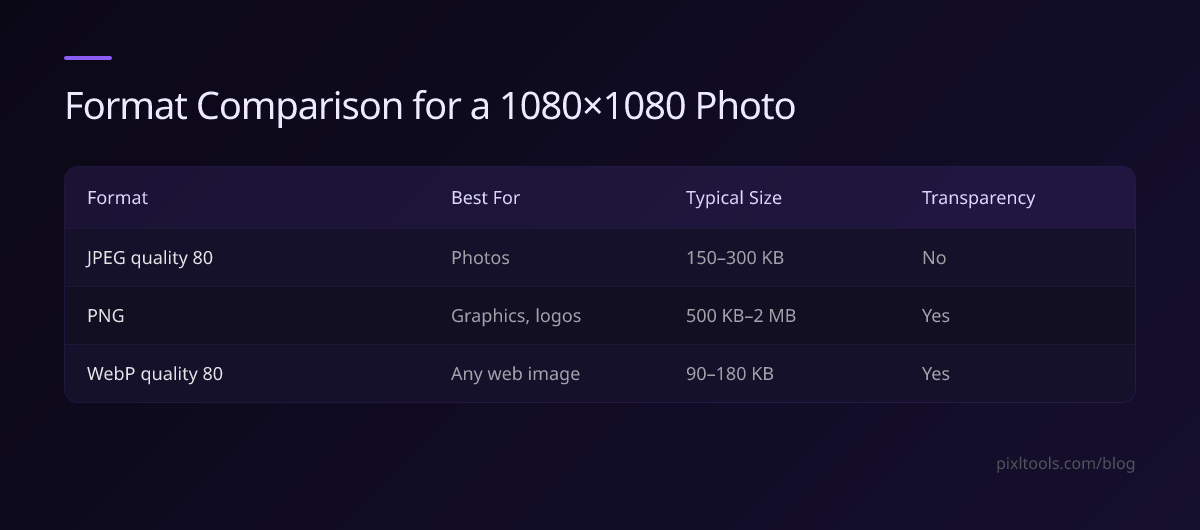
| Format | Best For | Typical 1080×1080 Size | Transparency |
|---|---|---|---|
| JPEG quality 80 | Photos | 150–300KB | No |
| PNG | Graphics, logos | 500KB–2MB | Yes |
| WEBP quality 80 | Any web image | 90–180KB | Yes |
Switch to WEBP for an immediate 25–35% size reduction: JPG to WEBP | PNG to WEBP.
Mobile Tips: Reducing Photo Size on iPhone and Android
Smartphone cameras shoot 10–50MP photos by default — far more resolution than any website or app needs.
- iPhone: Go to Settings → Camera → Formats → choose "Most Compatible" (JPEG). Or convert HEIC files after shooting with our HEIC to JPG tool.
- Android: In the camera app settings, reduce resolution to 8MP (3264×2448px) for a practical balance of quality and file size.
- After transfer to desktop: Run through our Compress Image tool to hit your target KB under any limit.
Developer Tips
For web developers handling user image uploads:
- Use Sharp (Node.js) with '.resize(800).jpeg({ quality: 80 })' for most web use cases
- Validate file size client-side with 'file.size' before upload and prompt users to compress oversized files
- Store only the processed version — never the raw upload — in cloud storage to minimize bandwidth and egress costs
- Consider serving WEBP with JPEG fallback using the HTML '<picture>' element