Choosing the Right Image Format
Picking the correct image format can cut your page load time in half. Each format has specific strengths — understanding them helps you serve the best image at the smallest size.
JPEG (JPG)
JPEG is the most widely supported image format, supported by every device and browser since 1992. It uses lossy compression, making it ideal for photographs and complex images with gradients.
Best for: Photos, product images, backgrounds, hero images
Not ideal for: Images with sharp text, logos, or transparency
PNG
PNG uses lossless compression and supports full transparency (including alpha channels). It's perfect for graphics, logos, and images that need pixel-perfect clarity.
Best for: Logos, icons, UI elements, screenshots, images with text
Not ideal for: High-resolution photographs (file sizes become very large)
WEBP
WEBP is a modern format developed by Google, offering superior compression for both lossy and lossless images. It achieves 25–35% smaller file sizes than JPEG at equivalent quality and 25% smaller than PNG.
Best for: All website images where browser support is available
Browser support: All modern browsers (Chrome, Firefox, Safari 14+, Edge)
SVG
SVG is a vector format — images scale to any size without losing quality. File sizes are tiny for simple graphics.
Best for: Icons, logos, illustrations, simple graphics
Not ideal for: Photos or complex raster images
Format Comparison Table
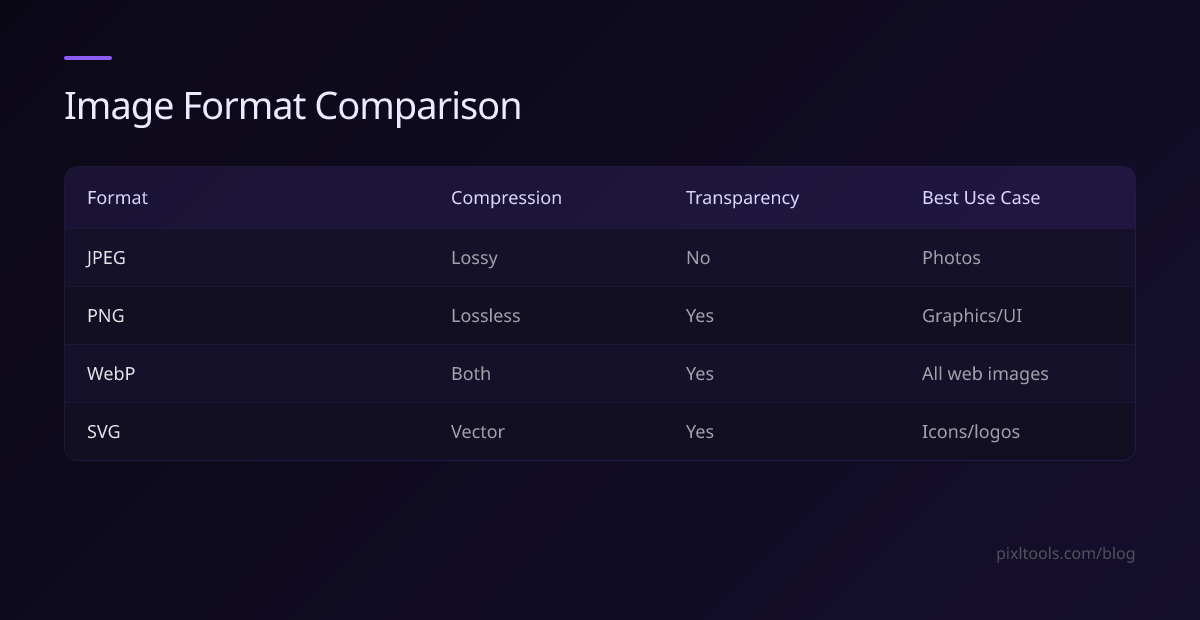
| Format | Compression | Transparency | Best Use Case |
|---|---|---|---|
| JPEG | Lossy | No | Photos |
| PNG | Lossless | Yes | Graphics/UI |
| WEBP | Both | Yes | All web images |
| SVG | Vector | Yes | Icons/logos |
Our Recommendation
Use WEBP as your primary format with JPEG/PNG fallbacks. For logos and UI elements, use SVG where possible. Convert all your existing images to WEBP using our free converter tools.