Why Image Compression Matters
Images account for over 60% of the average webpage's total weight. When you compress images effectively, you dramatically improve your website's loading speed, reduce bandwidth costs, and provide a better user experience.
Lossy vs Lossless Compression
Lossy compression permanently removes some image data to achieve smaller file sizes. JPEG format uses this method — you can control the quality level (1–100) to balance size and quality. At quality 80, most images look identical to the original but are 60–80% smaller.
Lossless compression reduces file size without removing any data. PNG files benefit from lossless compression — every pixel is preserved exactly. Tools like OptiPNG or Sharp's PNG optimization apply clever encoding to make files smaller without any quality loss.
Best Settings for Each Format
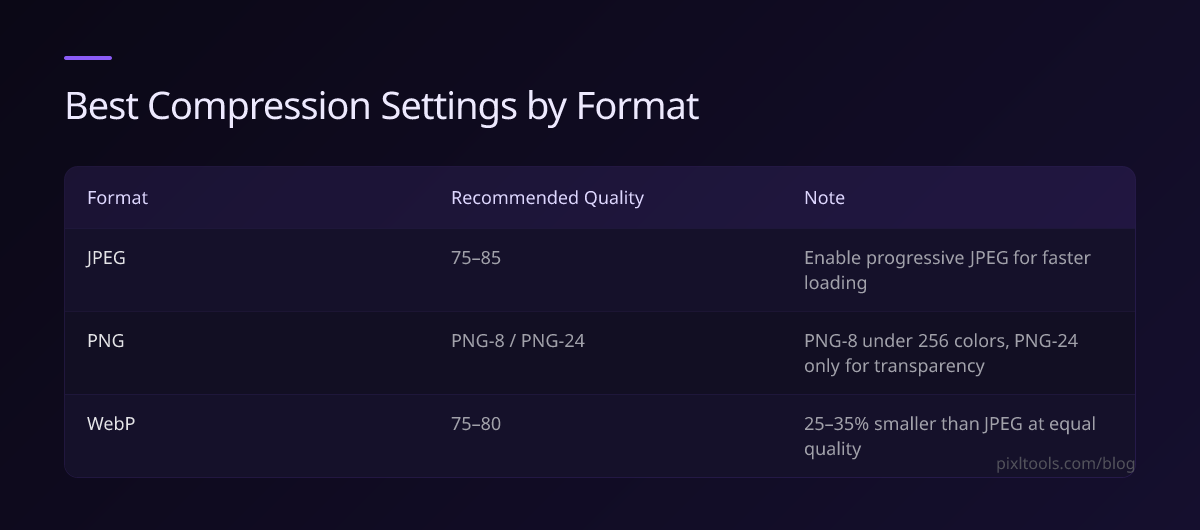
- JPEG: Use quality 75–85 for photos. Enable progressive JPEG for faster perceived loading.
- PNG: Use PNG-8 for images with fewer than 256 colors. Use PNG-24 only when transparency is essential.
- WEBP: Use quality 75–80. WEBP achieves 25–35% smaller sizes than JPEG at equivalent visual quality.
Tools for Compression
Online tools like PixlTools make compression effortless — simply upload your image and download the optimized version. For bulk processing, Sharp (Node.js) or ImageMagick are excellent choices.
Compression for Social Media
Each platform resizes and recompresses your images. To avoid double compression artifacts, upload at the recommended dimensions and use quality 90+. Facebook recommends 1200×630px for shared links, Instagram prefers 1080×1080px square images.