Why iPhone Photos Are So Large
Modern iPhones capture photos at 12–48 megapixels. A full-resolution iPhone 15 Pro photo at 48MP can be 15–25MB per file. Even iPhone 14 photos average 3–6MB each. This creates problems when:
- Uploading to websites with file size limits
- Sending as email attachments (most have 20–25MB limits)
- Filling up iCloud storage quickly
- Uploading to forms with strict size requirements (e.g., 200KB max)
Method 1: Use an Online Compressor (Fastest)
No app installation required. Works directly in Safari on your iPhone:
- Open Safari and go to pixltools.com/compress-image
- Tap the upload area
- Select your photo from your Camera Roll
- Adjust the quality slider (80 is ideal for most photos)
- Tap Download — the smaller file saves to your Files app
This is the fastest method for occasional compression. Reduces most iPhone photos to under 500KB.
Method 2: Change Camera Settings for Future Photos
Prevent large files from the start:
Switch to JPEG format (instead of HEIC):
Settings → Camera → Formats → Most Compatible
Reduce photo resolution:
Settings → Camera → Record Video (for video) — for photos, this only applies to iPhone 14 Pro+ with ProRaw or ProRes modes.
Smart HDR: Turning off Smart HDR slightly reduces file sizes (Settings → Camera → Smart HDR).
Method 3: Send via iMessage (Auto-Compresses)
If you need to share — not save — a smaller version, share via iMessage:
- In iMessage, tap the photo attachment icon
- Select your photo
- Tap Send — iMessage automatically compresses to approximately 1MB
You can then ask the recipient to share it back to you as the compressed version. Note: this is not ideal for important photos as quality is reduced.
Method 4: Use the Files App to Compress
iPhone's Files app supports basic file actions:
- Save your photo to Files (Share → Save to Files)
- Tap and hold the photo in Files
- Choose Compress (this creates a .zip file — not directly useful for JPG reduction, but reduces size for email attachments)
Better alternative: Upload to our Image Compressor directly from Files.
Resize Before Compressing for Maximum Reduction
If you need the smallest possible file, resize first then compress:
- Determine your target use (e.g., website thumbnail at 800px wide)
- Use our Resize Image tool: upload → set width to 800px → download
- Then run through our Image Compressor at quality 80
- Result: typically 50–150KB, down from 4–6MB original
Target File Sizes by Use Case
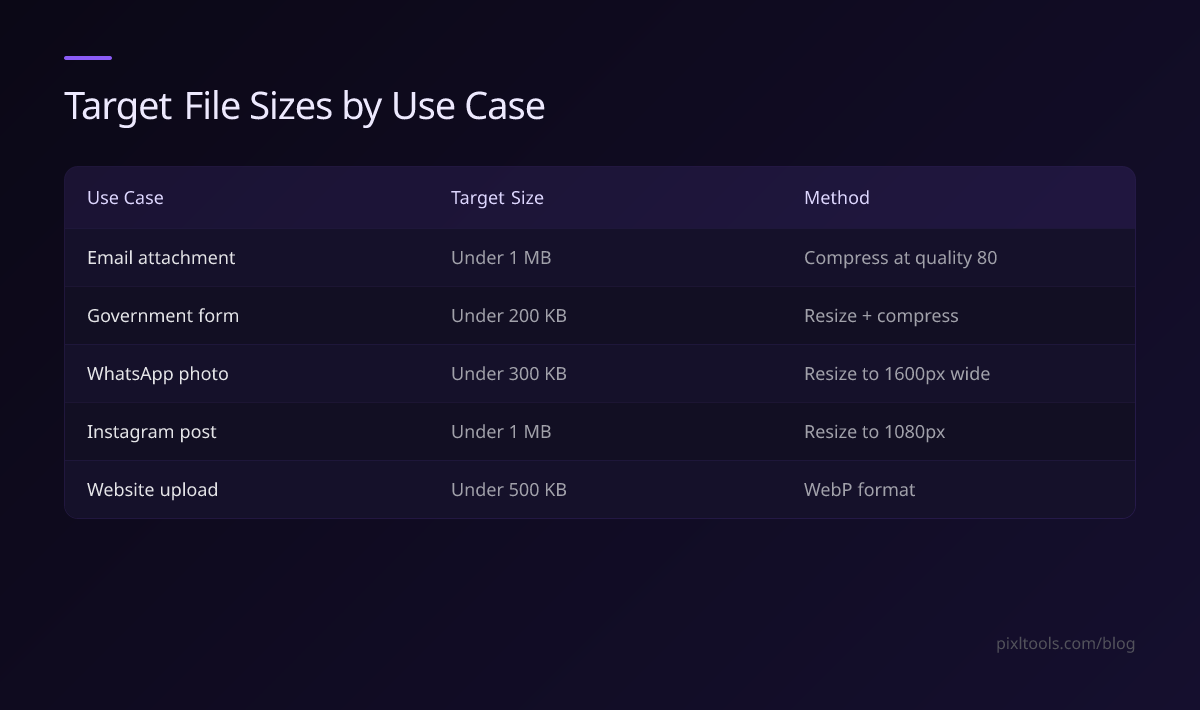
| Use Case | Target Size | Method |
|---|---|---|
| Email attachment | Under 1MB | Compress at quality 80 |
| Government form | Under 200KB | Resize + compress |
| WhatsApp photo | Under 300KB | Resize to 1600px wide |
| Instagram post | Under 1MB | Resize to 1080px |
| Website upload | Under 500KB | WebP format |
FAQ
Can I reduce file size without losing visible quality?
Yes. At quality 80, most iPhone photos are 60–75% smaller than the original with no perceptible quality loss to the human eye.
What is the fastest way to reduce file size on iPhone?
Use our Image Compressor in Safari — no app installation needed. Upload, compress, and download in under 30 seconds.
Does changing camera settings affect existing photos?
No — changing Formats in Camera Settings only affects future photos. Existing HEIC files stay as HEIC.
How small can an iPhone photo be compressed?
Most iPhone photos can be compressed to 100–300KB at quality 80 while still looking excellent on screen. Below 50KB, quality starts to become visibly degraded.