Why Convert JPG to PDF?
PDF is the universal document format — accepted by government offices, schools, employers, and businesses worldwide. When you need to submit photos as a document, convert images to a shareable portfolio, or archive photos in a printable format, PDF is the answer.
How to Convert JPG to PDF for Free
Use our free Image to PDF converter:
- Visit the Image to PDF tool
- Upload your JPG, PNG, or WEBP image (up to 10MB)
- Click "Process" — your image is instantly converted to a PDF
- Click "Download PDF" to save your file
No signup. No watermarks. Works on phones, tablets, and desktop.
Tips for the Best PDF Output
Use the highest quality original. PDF conversion preserves the image quality exactly. If you start with a blurry photo, the PDF will also be blurry.
Resize first for print. For A4 print (210×297mm at 300 DPI), your image should be at least 2480×3508px. Use our Resize Image tool first if needed.
Portrait vs landscape. Most PDFs default to portrait (vertical) orientation. For landscape photos (wider than tall), the PDF page will match the photo's orientation automatically.
Converting Multiple Images to PDF
Our online tool converts one image per PDF. For multi-image PDFs:
- Use Adobe Acrobat (paid) or PDF24 (free desktop tool)
- Combine image-to-PDF files using a PDF merger tool
The Reverse: PDF to JPG
Need to do the reverse? Our PDF to Image tool extracts PDF pages as JPG images, perfect for sharing a PDF slide as a social media post.
Common Use Cases for JPG to PDF Conversion
Government and Official Document Submissions
Most government portals — visa applications, tax authorities, job applications — require document uploads in PDF format. If you have a scanned ID, utility bill, or passport photo as a JPG, converting it to PDF makes it immediately submission-ready.
Creating a Photo Portfolio
Designers, photographers, and artists frequently need to send work samples to clients. A PDF portfolio looks far more professional than a folder full of JPEGs and opens cleanly on any device without extra software.
Academic and Job Applications
Universities and employers often require certificates, transcripts, or qualification scans in PDF. Converting your JPGs to PDF ensures your documents open correctly regardless of the recipient's operating system.
Archiving Physical Documents
If you photograph printed documents with your phone, converting those JPG photos to PDF creates archivable, searchable digital records. Named and dated PDF files are far easier to store and retrieve than loose image files.
Understanding Image Quality in PDFs
When you embed a JPEG into a PDF, the image quality is preserved exactly as uploaded — the PDF format itself does not add compression. This means:
- Start with the highest quality original — if the JPG was heavily compressed (quality 50 or below), the PDF will have the same compression artifacts
- For web / email use: A 1200×1600px JPEG at quality 80 is ideal — small file, clear screen quality
- For A4 print (210×297mm): You need at least 2480×3508px at 300 DPI for sharp print output
- For passport photo PDFs: Upload at the portal's specified pixel dimensions (commonly 413×531px at 96–200 DPI)
What is DPI and Does it Matter for JPG to PDF?
DPI (dots per inch) matters for print but not for screen display. For most online submissions and digital documents:
- Screen / web use: 72–96 DPI is perfectly fine — the image will look sharp on any monitor
- Standard print (office, home): 150 DPI is adequate for laser printers
- Professional print: 300 DPI at final print dimensions for crisp, professional results
Our Resize Image tool can help you hit the exact pixel dimensions required before converting to PDF.
Comparing JPG to PDF Conversion Tools
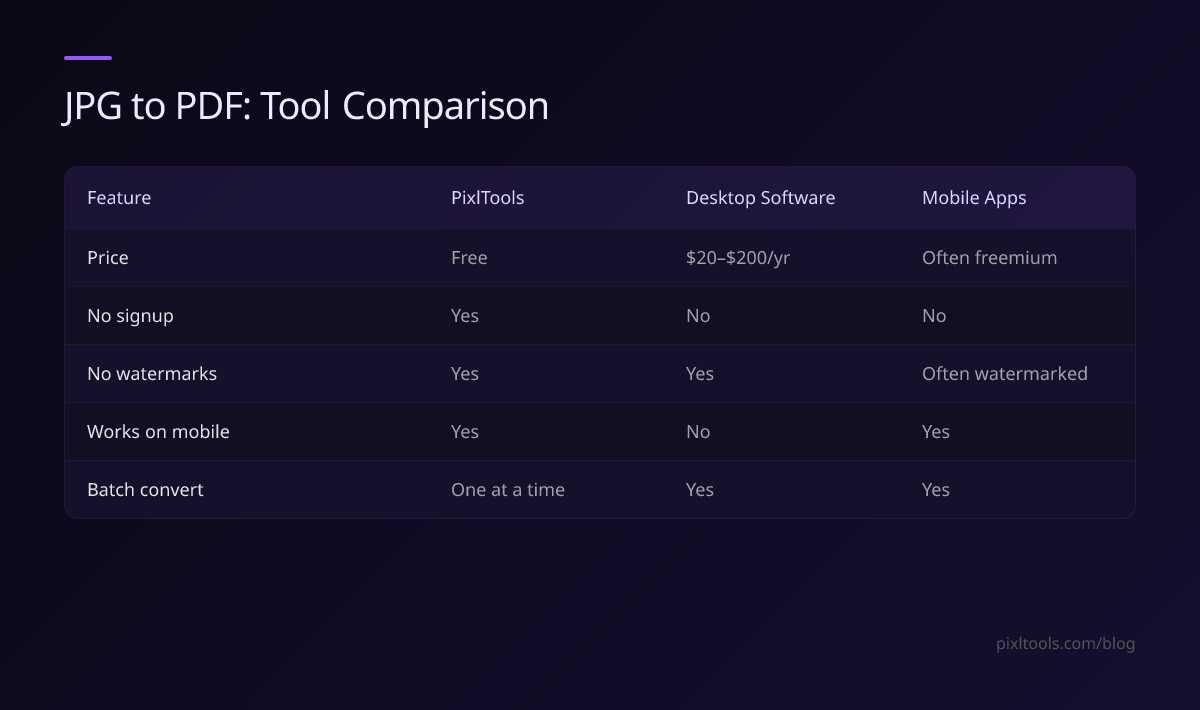
| Feature | PixlTools | Desktop Software | Mobile Apps |
|---|---|---|---|
| Price | Free | $20–$200/year | Often freemium |
| No signup | Yes | No | No |
| No watermarks | Yes | Yes | Often watermarked |
| Works on mobile | Yes | No | Yes |
| Batch convert | One at a time | Yes | Yes |
FAQ
What image formats can I convert to PDF?
JPG, PNG, and WEBP. All common web formats are supported.
Is the PDF output good quality for printing?
Yes — at 150 DPI for screen use and digital submission. For professional print, start with a high-resolution image (300+ DPI source).
Is it free?
Completely free, with no watermarks on the output PDF.
Can I convert a PNG or WEBP to PDF?
Yes — PixlTools accepts JPG, PNG, and WEBP for PDF conversion. Upload any of these formats and get a clean PDF instantly.
Why is my converted PDF so large?
PDF file size reflects the original image size. Compress your image first with our Compress Image tool, then convert to PDF for a smaller output.