PNG to JPG — The Fastest Way
Converting PNG to JPG takes seconds with our free online tool. No software, no signup, no waiting.
Steps:
- Visit our free PNG to JPG converter
- Upload your PNG file (up to 10MB)
- Choose your quality level (80 is recommended)
- Click download — your JPG is ready instantly
Why Convert PNG to JPG?
File size: PNG uses lossless compression — great for quality, but file sizes are enormous for photos. A 1200×800 photo PNG might be 3–4 MB. The same image as a JPEG at quality 80? 200–400 KB.
Compatibility: JPEG is supported by every device, browser, email client, and platform on earth.
Email attachments: Many email servers reject attachments over 5 MB. Converting a PNG photo to JPEG gets it well under the limit.
When NOT to Convert PNG to JPG
Logos and icons: PNG preserves sharp edges and transparency. Converting a logo to JPEG introduces compression artifacts and removes the transparent background entirely.
Screenshots with text: Text in JPEG suffers from ringing artifacts around each character. Keep screenshots as PNG.
Images with transparency: JPEG doesn't support transparent backgrounds. Use PNG or WEBP for transparent images.
Quality Settings Explained
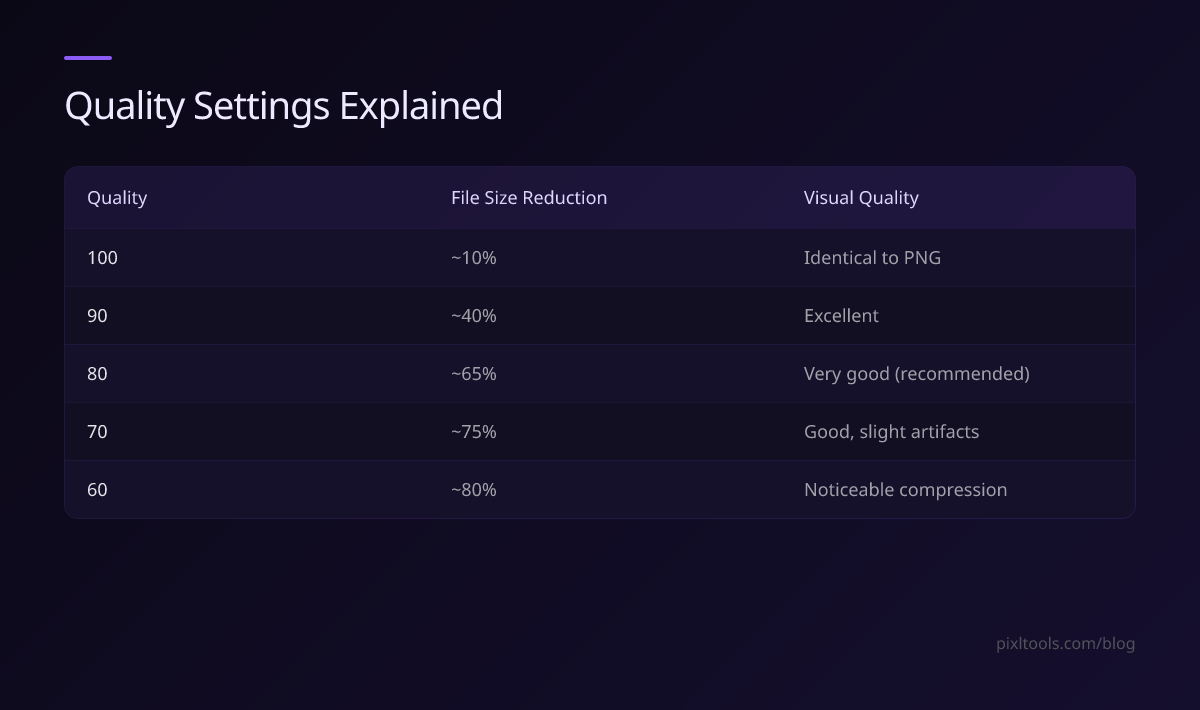
| Quality | File Size Reduction | Visual Quality |
|---|---|---|
| 100 | ~10% | Identical to PNG |
| 90 | ~40% | Excellent |
| 80 | ~65% | Very good (recommended) |
| 70 | ~75% | Good, slight artifacts |
| 60 | ~80% | Noticeable compression |
PNG to WEBP: An Even Better Alternative
If your target platform supports WEBP (all modern browsers do), convert PNG to WEBP instead of JPEG. WEBP achieves 25% smaller files than JPEG at equivalent quality, and supports transparency.
Use our PNG to WEBP converter for the best of both worlds — smaller than JPG and supports transparency.
FAQ
Does converting PNG to JPG lose quality?
Yes — JPEG uses lossy compression, so some image data is discarded. At quality 80, the loss is barely perceptible for photos.
Does converting PNG to JPG remove the background?
Yes — JPEG doesn't support transparency. Any transparent areas become white by default.
What's the best quality setting?
Quality 80 is the sweet spot — 65% smaller than the PNG with no visible quality difference for most photos.